
The DSKY Verb and Noun System Explained
A complete guide to the DSKY's Verb-Noun command interface — how it worked, the most important codes, and why this 1960s design was a masterpiece of human-computer interaction.
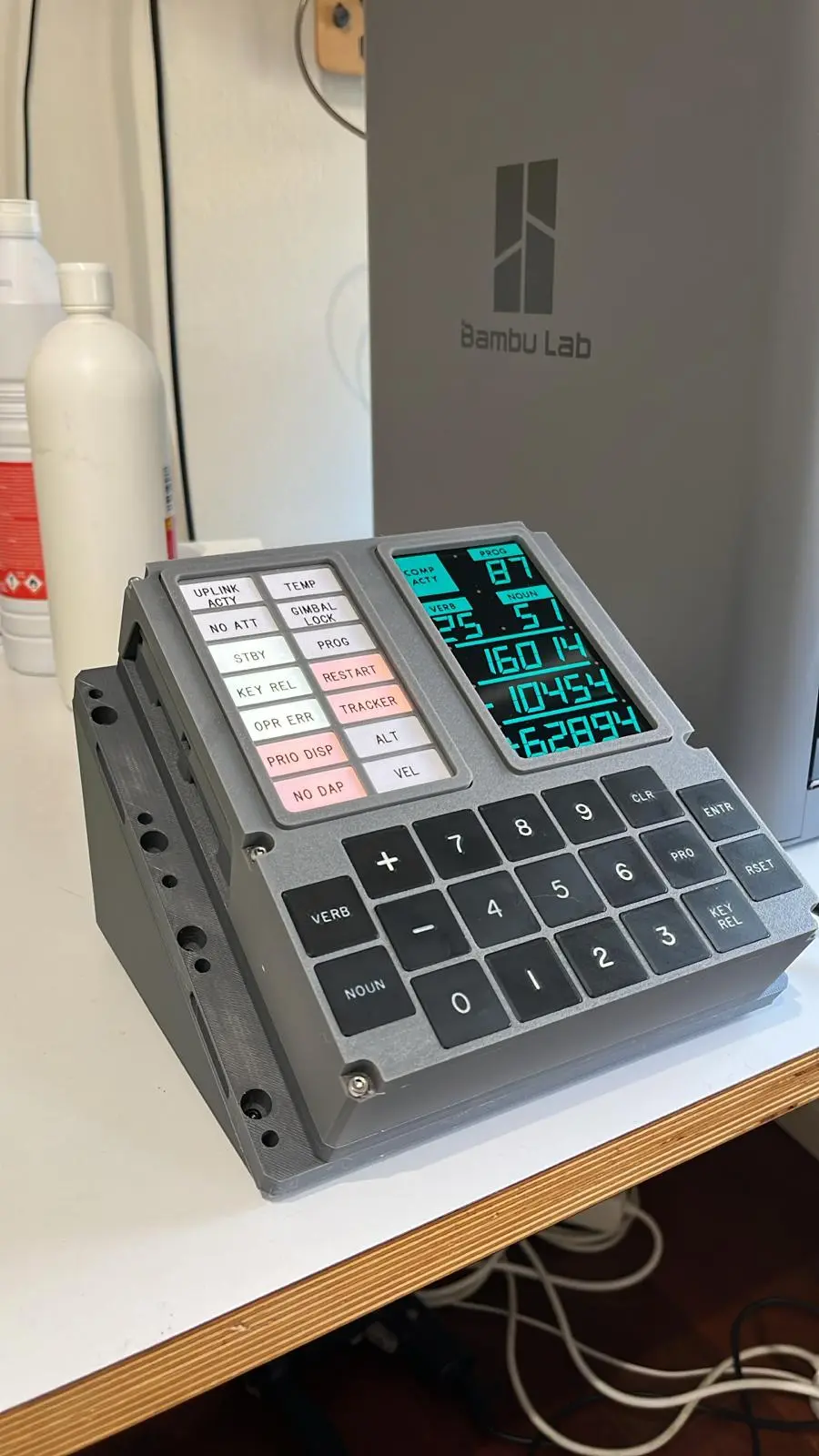
A Computer Interface Like No Other
In the mid-1960s, the engineers at MIT's Instrumentation Laboratory faced a problem no one had solved before: how do you let astronauts communicate with a digital computer in real time, while wearing bulky pressure suits, in the hostile environment of space? There were no mice, no touchscreens, no graphical displays. The answer they devised — the Verb-Noun system — became one of the most elegant human-computer interfaces ever created.
The DSKY (Display and Keyboard), pronounced "DIS-key," was the sole interface between the Apollo crew and the Apollo Guidance Computer (AGC). Every navigation command, every program change, every data request flowed through a 19-key keypad and a set of electroluminescent numeric displays. The language that tied it all together was built on just two concepts: Verbs and Nouns.
How the System Works
The principle is deceptively simple. A Verb tells the computer *what to do*. A Noun tells it *what data to work with*. Together, they form a complete instruction.
To issue a command, an astronaut would:
- Press the VERB key
- Type a two-digit Verb code (00–99)
- Press the NOUN key
- Type a two-digit Noun code (00–99)
- Press ENTR (Enter) to execute
The DSKY's display would show the current Verb and Noun codes in dedicated fields at the top of the panel, along with up to three five-digit numeric registers (R1, R2, R3) that displayed data or accepted input.
This gave astronauts a theoretical command space of 10,000 combinations — far more than they would ever need — while keeping every interaction to just a few keystrokes.
Verb Categories
Verbs were organized into logical groups based on their function:
Display Verbs (01–19) requested the computer to show data on the DSKY's registers. These were the most commonly used verbs during routine operations.
Keyboard Input Verbs (20–39) allowed astronauts to load data into the computer. When a keyboard input verb was active, the DSKY would flash to indicate it was waiting for the crew to type values.
Extended Verbs (40–99) triggered specific computer actions such as running programs, performing calculations, or executing maneuvers.
Complete Reference of Common Verb Codes
- V01 — Display octal component 1 of a noun in R1
- V02 — Display octal component 2 of a noun in R2
- V03 — Display octal component 3 of a noun in R3
- V04 — Display octal components 1 and 2 in R1 and R2
- V05 — Display octal components 1, 2, and 3 in R1, R2, and R3
- V06 — Display decimal data in R1, R2, and R3
- V11 — Monitor octal component 1 in R1 (auto-refresh)
- V16 — Monitor decimal data in R1, R2, and R3 (auto-refresh)
- V21 — Load component 1 into R1
- V22 — Load component 2 into R2
- V23 — Load component 3 into R3
- V24 — Load components 1 and 2 into R1 and R2
- V25 — Load components 1, 2, and 3 into R1, R2, and R3
- V32 — Recycle — return to the last average-G display
- V33 — Proceed without data — tell the computer to continue
- V34 — Terminate current program or function
- V35 — Test lights — illuminate all DSKY displays and indicators
- V36 — Request fresh start of the computer
- V37 — Change major program (the master program selector)
- V69 — Cause restart
- V82 — Request orbital parameters display
- V93 — Enable IMU compensation
Complete Reference of Common Noun Codes
- N06 — Option code (used with V21 to input choices)
- N09 — Alarm codes
- N17 — Astronaut's ID number and desired attitude
- N20 — ICDU angles (IMU gimbal angles)
- N22 — New ICDU angles
- N26 — Priority and address for jobs
- N29 — XSM launch azimuth
- N33 — Time of ignition (hours, minutes, seconds)
- N36 — Time of AGC clock (hours, minutes, seconds)
- N37 — Current program number
- N40 — Time from ignition/cutoff (seconds)
- N43 — Latitude, longitude, altitude
- N44 — Orbital parameters (apoapsis, periapsis, TFF)
- N47 — AGC system test inputs
- N50 — Surface flag data
- N54 — Range, range rate, theta
- N60 — Gyro torquing angles (X, Y, Z)
- N62 — Velocity, altitude rate, altitude
- N63 — Altitude, velocity, altitude rate
- N65 — Time from ignition, velocity to be gained, accumulated delta-V
- N66 — LM forward and lateral velocity, altitude rate
- N67 — Autopilot control parameters
- N68 — LM slant range, position, velocity
- N69 — Desired and current body attitude rates
- N73 — Altitude, altitude rate, computed altitude
- N81 — Delta-V (LV), delta-V (body), delta-V (total)
- N85 — Velocity to be gained (VGX, VGY, VGZ)
- N93 — Elevation and delta altitude for landing
The Commands Astronauts Used Most
During a typical Apollo mission, certain Verb-Noun combinations were used far more than others. Here are the essential combinations every astronaut had memorized:
V06 N62 — Display Velocity, Altitude Rate, and Altitude. This was the go-to combination during powered descent. It showed three critical numbers on the DSKY: the spacecraft's velocity, how fast the altitude was changing, and the current altitude above the lunar surface. Armstrong monitored this display constantly during the final minutes of the Apollo 11 landing.
V16 N65 — Monitor Time from Ignition, Velocity to Be Gained, and Delta-V. Used during powered maneuvers, this combination continuously updated three registers showing elapsed time since engine ignition, remaining velocity to achieve, and total velocity change accumulated. The V16 prefix meant the display automatically refreshed — no need to repeatedly request updates.
V37 N00 — Change Program. This was the master switch for the AGC's major programs. Typing V37, then entering a two-digit program number in R1, would switch the computer to an entirely different operational mode. Program 63 (P63) handled the braking phase of lunar descent. Program 66 (P66) gave the astronaut manual throttle control. Program 11 (P11) managed Earth orbit insertion.
V35 E — Test Lights. Pressing V35 followed by Enter lit up every segment of the DSKY display and every status indicator. Astronauts used this for pre-flight verification to ensure no display elements had burned out.
V16 N68 — Monitor LM Range Data. During rendezvous maneuvers, this combination showed the Lunar Module's slant range, position, and velocity relative to the Command Module — essential data for docking.
Why This Interface Was Brilliant
It is tempting to look at the Verb-Noun system as primitive — after all, who would type numeric codes when you could have a graphical interface? But this misses the genius of the design.
Minimal keystrokes. Every command required at most seven key presses (VERB + two digits + NOUN + two digits + ENTR). In an emergency, that brevity could save lives.
Glove-compatible. The 19 large, tactile pushbuttons were designed to be operated by astronauts wearing thick EVA gloves. A touchscreen or small keyboard would have been impossible.
Self-documenting. The Verb and Noun codes were displayed on the DSKY panel at all times. An astronaut could glance at the display and immediately know what the computer was doing and what data it was showing.
Fault-tolerant. If an astronaut typed an invalid combination, the DSKY would light the OPR ERR (Operator Error) indicator — no crash, no reboot, just a clear signal to try again.
Extensible. MIT's software engineers could add new programs and data displays without changing the hardware. New Verb and Noun codes could be defined in software updates for each mission.
Trainable. Astronauts could learn the essential Verb-Noun codes in hours. The full set was printed on reference cards attached to the spacecraft panels. The system struck a perfect balance between power and simplicity.
The Cheat Sheet
Every Apollo spacecraft carried laminated reference cards listing the most important Verb-Noun combinations. These cards were Velcroed to the instrument panel within arm's reach. During simulations and actual missions, even the most experienced astronauts consulted these cards regularly — there was no shame in looking up a code when lives were on the line.
The reference card for the Lunar Module's descent phase typically listed about 30 key combinations, organized by mission phase: pre-descent checkout, powered descent initiation, braking, approach, and landing.
A Design for Its Time — and Beyond
The Verb-Noun system was born from the constraints of 1960s technology, but its core principles remain relevant. Modern command-line interfaces, keyboard shortcuts, and even voice assistants echo the same idea: a structured, compact language for communicating intent to a machine.
When you interact with a DSKY replica from apolloreplica.com, you are using the same Verb-Noun codes that guided Apollo astronauts across 240,000 miles of space. Every V06 N62 you type connects you to the moment when human ingenuity bridged the gap between a 74-kilobyte computer and the surface of the Moon.