
yaAGC and NASSP: Running Apollo Software Today
A complete guide to yaAGC, the open-source Apollo Guidance Computer emulator, and NASSP, the Orbiter Space Flight Simulator addon. Learn how to run real Apollo flight software and connect your Apollo Replica DSKY as a physical interface.
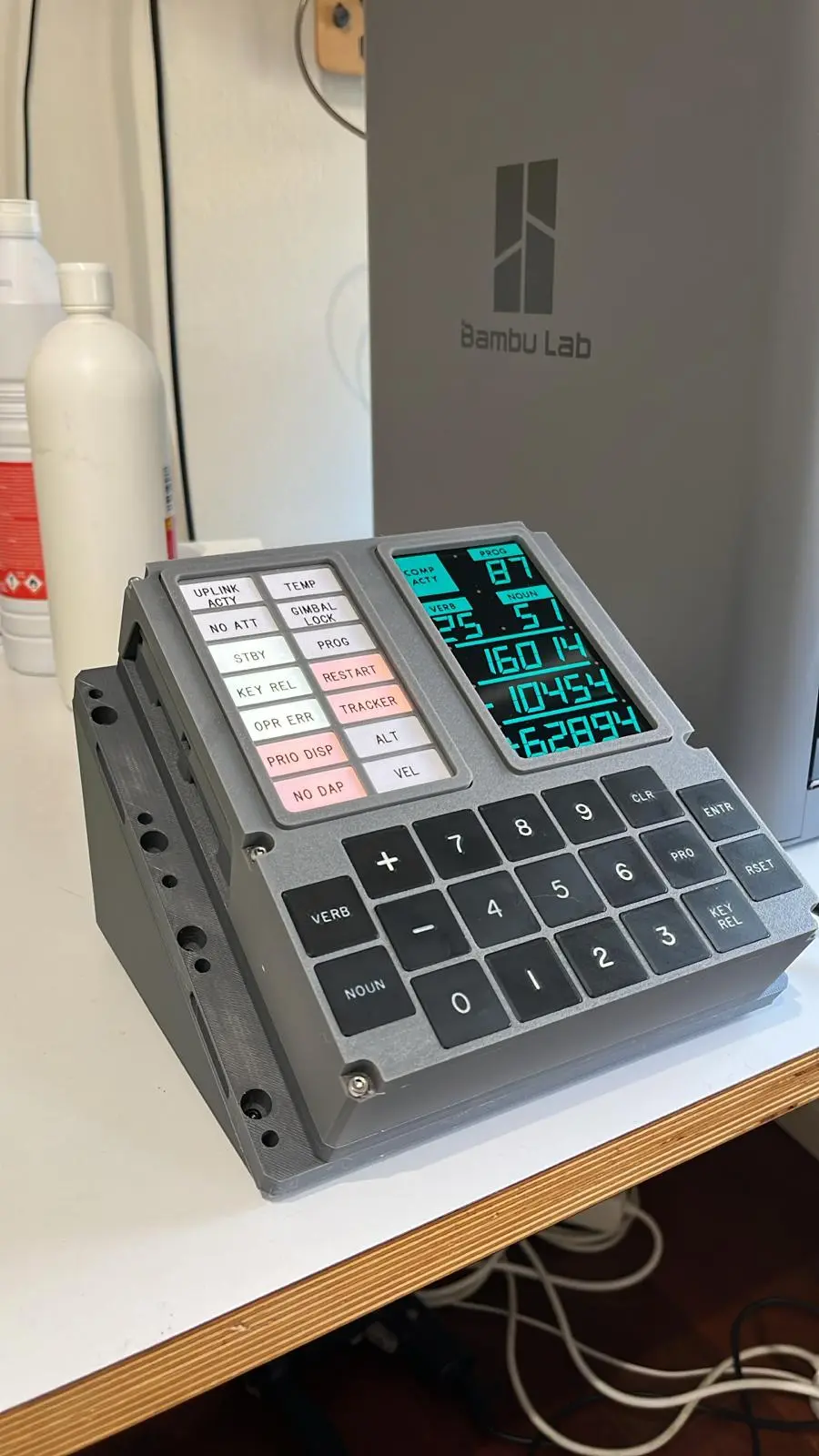
Running the Real Apollo Software in Your Living Room
More than fifty years after the last Apollo mission, the software that guided astronauts to the Moon is not lost to history. Thanks to an extraordinary open-source effort, you can run the actual Apollo Guidance Computer flight code on your own computer today. Even more remarkably, you can connect a physical Apollo Replica DSKY replica to interact with it using the same Verb and Noun commands that Armstrong, Aldrin, and Collins used.
This guide covers everything you need to get started with yaAGC and NASSP — from understanding what they are to having a fully working Apollo simulation on your desk.
What Is yaAGC?
yaAGC (Yet Another Apollo Guidance Computer) is an open-source emulator that runs authentic Apollo Guidance Computer software. It was created by Ronald Burkey as part of the Virtual AGC project, which began in 2003 with an ambitious goal: preserve the Apollo flight software by making it executable on modern hardware.
The emulator does not approximate or simulate AGC behavior — it runs the actual flight code that was used during Apollo missions. The original AGC source code was painstakingly recovered from hardcopy printouts archived at MIT and by NASA, then transcribed into machine-readable form by teams of volunteers.
Key features of yaAGC:
- Cycle-accurate emulation of the AGC hardware, including the 15-bit word size, the priority-based executive, and the interrupt system
- Runs original Apollo software builds including Colossus (Command Module) and Luminary (Lunar Module)
- Provides peripheral emulation for the DSKY interface, IMU, optics, and other AGC-connected hardware
- Network-based architecture that allows separate programs to emulate different spacecraft components
- Cross-platform support for Windows, macOS, and Linux
What Is NASSP?
NASSP (NCPP Apollo Spacecraft Simulation Project) is an addon for Orbiter Space Flight Simulator that provides a highly detailed simulation of the Apollo spacecraft. Unlike simplified Apollo recreations, NASSP models the spacecraft systems at an engineering level of detail.
When combined with yaAGC, NASSP creates something truly special: a flight simulation where the guidance computer runs the real Apollo software, and the spacecraft responds according to accurate physical models.
What NASSP provides:
- Detailed 3D models of the Command Module, Service Module, Lunar Module, and Saturn V launch vehicle
- Accurate system simulation including electrical, environmental control, propulsion, and communications systems
- Integration with yaAGC for authentic guidance computer operation
- Full mission capability from launch through translunar injection, lunar orbit, descent, landing, ascent, rendezvous, and Earth return
- A virtual cockpit with clickable panels that replicate the actual Apollo instrument layout
Setting Up yaAGC
Getting yaAGC running is straightforward. Here is the step-by-step process:
1. Download the Virtual AGC package
Visit the Virtual AGC project page and download the latest release for your operating system. The package includes the yaAGC emulator, the yaDSKY2 graphical DSKY interface, and several Apollo software builds.
- Windows: Download the installer (.msi) and run it
- macOS: Download the .dmg and drag to Applications
- Linux: Download the tarball or build from source using the provided Makefile
2. Choose your Apollo software build
The package includes several mission-specific builds:
- Colossus249: Apollo 9 Command Module software
- Comanche055: Apollo 11 Command Module software (the version Colins used)
- Luminary099: Apollo 11 Lunar Module software (the version Armstrong and Aldrin used)
- Luminary131: Apollo 13 Lunar Module software
- Artemis072: Apollo 15-17 Command Module software
For your first run, Comanche055 or Luminary099 are excellent starting points since they are the most documented.
3. Launch the emulator
On Windows, use the provided batch files or shortcuts. On macOS and Linux, open a terminal and run:
- Start yaAGC with your chosen software build
- Start yaDSKY2 to get the graphical DSKY interface
- The two programs communicate over a local network socket
Once running, you will see the familiar DSKY display appear on screen. The COMP ACTY light will blink as the AGC runs through its initialization sequence.
4. Test basic operations
Try these commands to verify everything is working:
- Verb 16 Noun 36 — Display current time (hours, minutes, seconds in registers 1, 2, 3)
- Verb 35 Enter — Test all DSKY lights and segments
- Verb 37 Noun 00 Enter, then 00 Enter — Start the idle program (Program 00)
Setting Up NASSP with Orbiter
For the full Apollo experience, you will want NASSP running inside Orbiter:
1. Install Orbiter Space Flight Simulator
Download Orbiter 2016 from the official site. Install it to a directory with a short path (avoid deeply nested folders, as some NASSP file paths can be long).
2. Install NASSP
Download the latest NASSP release from the project's GitHub repository. Extract the contents into your Orbiter installation directory, merging with existing folders when prompted.
3. Configure the yaAGC connection
NASSP can use its internal AGC simulation or connect to an external yaAGC instance. To use the real AGC software:
- Open the NASSP configuration file in the Orbiter directory
- Enable the external AGC connection option
- Ensure yaAGC is running before launching a NASSP scenario
4. Launch a mission
Start Orbiter, select a NASSP scenario (such as "Apollo 11 - Launch"), and you are ready to fly. The DSKY in the virtual cockpit will display the same data as your external yaAGC instance.
Connecting Your Apollo Replica DSKY
This is where things get truly exciting. The Apollo Replica DSKY replica is designed to work as a physical peripheral for yaAGC, replacing the on-screen yaDSKY2 with real buttons and electroluminescent-style displays.
How it works:
The Apollo Replica DSKY connects to your computer via USB serial. It speaks the same network protocol that yaAGC uses for peripheral communication. When you press VERB on the physical DSKY, the signal goes to yaAGC exactly as if you had clicked the button on the screen emulator. When the AGC updates the display, the numbers appear on your physical DSKY's seven-segment displays.
Setup steps:
- Connect your Apollo Replica DSKY to your computer via the included USB cable
- Install the Apollo Replica DSKY driver software (available from our GitHub repository)
- Configure the driver to connect to your running yaAGC instance
- Launch yaAGC with the appropriate software build
- Your physical DSKY is now live — press VERB, type 35, press ENTER, and watch all the display segments light up
The experience:
There is something profoundly different about pressing physical keys that click under your fingers, watching real LED segments illuminate, and knowing that the actual Apollo flight code is processing your input. The on-screen emulator is educational. The physical DSKY is visceral.
When you execute Verb 37 Noun 06 Enter to start Program 06 (the powered descent guidance), and the PROG display shows 06, and the COMP ACTY light blinks as the AGC runs through its calculations — you are experiencing what Armstrong experienced, through the same interface, running the same code.
Running a Complete Apollo 11 Landing
Once you have yaAGC, NASSP, and your Apollo Replica DSKY all working together, you can attempt the most famous spaceflight maneuver in history. Here is a condensed walkthrough:
- Load the Apollo 11 descent scenario in NASSP
- The AGC should be running Luminary099 with Program 63 (Braking Phase) active
- Monitor your DSKY — it will display altitude, velocity, and descent rate
- Watch for the 1202 alarm at approximately 33,500 feet — just as it happened in 1969
- At about 500 feet, the AGC transitions to Program 66 (manual landing mode)
- Use Verb 06 Noun 62 to monitor your final descent parameters
- When the contact light illuminates, hit the ENGINE STOP button
The entire descent takes about 12 minutes — the same 12 heart-pounding minutes that Armstrong and Aldrin experienced.
The Community
The Virtual AGC and NASSP communities are among the most dedicated groups in the simulation world:
- Virtual AGC Discussion Group: Active forum for yaAGC users, with Ronald Burkey himself regularly answering questions
- NASSP GitHub: Open development with regular updates and bug fixes
- Orbiter Forum NASSP Thread: Years of discussion, tips, and mission reports from community members
- Apollo Replica DSKY Discord: Our community server where DSKY owners share their setups, help each other with yaAGC configuration, and discuss Apollo history
These communities welcome newcomers. Whether you are a software engineer interested in the AGC architecture, a space history enthusiast wanting to understand Apollo operations, or a simulator pilot looking for the ultimate challenge, there is a place for you.
Beyond Simulation: What You Learn
Running Apollo software is not just a novelty — it is an education. You will develop an intuitive understanding of:
- How real-time systems work: Watching the AGC juggle multiple programs with fixed time budgets teaches you about scheduling, priorities, and determinism
- How astronauts operated: The Verb-Noun system forces you to think in the same structured way that Apollo crews were trained to think
- How software engineering began: The AGC program was where the term "software engineering" was coined. Running the code gives you appreciation for the discipline Margaret Hamilton and her team invented
- How little you really need: When you see a 74KB program guide a spacecraft through a lunar landing, it permanently changes how you think about software complexity
Getting Started Today
The beauty of this ecosystem is that you can start at any level:
- Software only: Install yaAGC and yaDSKY2, and start exploring Apollo software in minutes, completely free
- Full simulation: Add Orbiter and NASSP for the complete visual experience of flying an Apollo mission
- Physical interface: Add a Apollo Replica DSKY replica for the tactile experience of pressing the same buttons the astronauts pressed, running the same code that took humanity to the Moon
Every Apollo Replica DSKY ships with a quick-start guide for yaAGC connection. Our Discord community is always ready to help with setup questions. And once you hear that first click of the VERB key and see the COMP ACTY light respond — you will understand why we built this.